 LIVE
LIVELoading and storage
Current operations and how busy the storage area is
rtsp.me makes the streams of existing IP cameras available in an ordinary browser on a computer, smartphone or tablet. A manager can see the overall situation at remote sites without constantly traveling between them.
Online video helps you spot a visible queue at a dock, a build-up of orders or an overloaded pickup point, and the archive helps you reconstruct the sequence of events. It is an additional source of facts for management, not a replacement for warehouse records and the work of the responsible staff.
Connect warehouse camerasA camera with a wide field of view shows how work is spread across the gates, whether there is a queue of vehicles, whether the receiving area is clear and whether orders have piled up before packing. A manager gains visual context for the WMS figures and the shift's reports.
For a pickup point, a view of the entrance and the queue is useful, without close-ups of documents or screens. A recording is especially useful in a dispute about the time a vehicle arrived, the order of loading or the handover of an order: the video can be compared with delivery notes and logs without being treated as the only evidence.
If a warehouse camera delivers an available RTSP stream, it can be connected to rtsp.me without dismantling the video surveillance system in place. Support for the common H.264 and H.265 codecs makes it easier to work with equipment from different manufacturers.
For online viewing you usually pick a secondary stream with a sensible resolution and bitrate. The main recording to the local recorder can carry on exactly as before. Before going live, check the network, the clock, the field of view and that the frame contains no markings on valuable goods, no personal data and no screens of internal systems.
The service brings viewing, publishing and technical oversight of cameras together for a single warehouse or a distributed network of sites.
Before setting things up, decide who is responsible for access and choose the cameras whose fields of view genuinely help you run the warehouse.
Once it is live, check the stream from an external network and from a smartphone, and make sure the on-duty member of staff receives the unavailability notification.
The set of fields of view depends on the layout, the flows of people and equipment, occupational safety requirements and the access regime. The following are usually useful:
A single wide field of view does not show the contents of a package, the exact stock level or the reason for a delay, so the picture is always assessed alongside operational data.
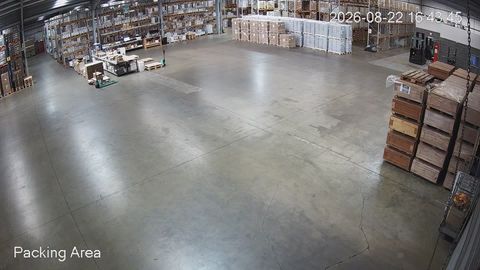
A live field of view shows the visible loading operations and the current situation in the storage area.
LIVECurrent operations and how busy the storage area is
A single account cuts the time spent switching between separate recorders. Naming cameras on a “site — area — field of view” pattern helps a controller open the right stream quickly during a call from the warehouse.
A manager can compare the visible workload of similar areas and check that a gate is ready for an incoming vehicle. Decisions about resources are taken with the WMS data, schedules, documents and shift feedback in mind.
A depersonalized view of the queue can sometimes reasonably be embedded on a customer-facing page. Cameras covering storage, receiving and back-office rooms should stay private; for those, use a password and a restriction to an allowed domain.
The cloud archive lets you return to a specific interval and check the visible sequence of operations. A recording is easy to compare with scanning times, electronic documents and the access log, bearing in mind that system clocks may differ.
The retention period is chosen in proportion to the operational task and personal data requirements. Access to the archive, exports and links is granted to the smallest possible group of authorized staff.
rtsp.me monitors the availability of the connected stream and reports a loss of signal. The notification helps you start diagnosing the power, the network or the camera, but it does not replace maintenance and fallback procedures.
A field of view must not show passwords, WMS screens, documents, payment data or address labels. Staff and visitors are informed about video surveillance in line with the applicable requirements.
Online video does not replace a WMS, stocktaking, weighing and scanning equipment, fire and security systems, occupational safety or the decisions of staff. A picture cannot reliably establish a stock level, the quality of goods, whether racking is sound or whether a manoeuvre is safe.
Connect your existing RTSP cameras so you can see working areas in a browser and go back to the recording when reviewing events. Start with a few genuinely useful fields of view and extend the setup as the need is confirmed.
A single remote overview helps a manager get visual context faster, without displacing the WMS, the paperwork or the professional judgement of the team.
Set up warehouse cameras