Live cameras for flower shops
rtsp.me turns the stream of an existing IP camera into a live stream that the owner or buyers can open in a browser on any device.
Watch the sales floor and the arranging area, and show customers a wide view of fresh flowers and finished bouquets — with no media server of your own.
Connect a shop cameraRemote oversight for the owner
The owner or manager can open the cameras in a browser and see the general situation in the shop: the state of the displays, activity on the sales floor, work in the arranging area and whether the shop is ready to open.
Cameras from several shops can be gathered in one account. That suits a chain of florists, units inside shopping centers and round-the-clock shops.
Video gives visual context, but it does not replace stock-keeping systems, stocktaking, flower quality checks or a conversation with the member of staff in charge.
Choosing flowers online
A public camera helps a buyer look at the display, the overall palette and the finished bouquets before setting off or ringing the shop.
The player can sit on your website next to the address, the contact details and the order form. The customer sees the display as it is and can explain to the florist more quickly which style or combination appealed to them.
The picture shows the range that happens to be in shot at a given moment, but it does not guarantee that an individual flower or bouquet is available. Exact availability, price and whether an item can be reserved should be confirmed with the shop.
Live stream examples
For buyers, a wide shot of the display or of the finished bouquets works well. Internal cameras covering the till, the store room and working areas are better left private.
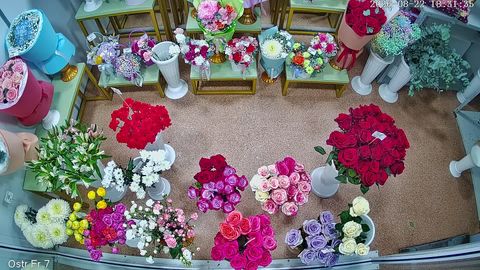
Fresh flowers on display
A live view of the shop's range and color palette
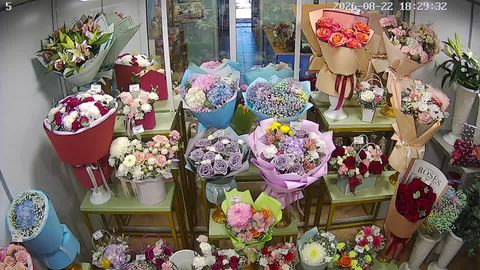
Finished bouquets and arrangements
Picking a suitable option before speaking to a florist
Use the cameras you already have
If the shop already runs IP surveillance, a compatible camera with an RTSP stream can be connected to rtsp.me without replacing any equipment.
Viewing needs no separate video server, capture card or permanently running computer. The service takes the stream and makes it available in a modern browser.
Before publishing, choose a stable field of view, check the lighting and keep the till screen, documents, payment details and other internal information out of shot.
What rtsp.me gives you
One service covers both a public display for buyers and private viewing for the shop owner.
- DisplayA public view of flowers and finished bouquets on your website
- OversightRemote viewing of the shop from any device
- CompatibilityConnect RTSP cameras using H.264 and H.265
- ChainCameras from several outlets in one account
- ProtectionRestricted access by password or domain
- ArchiveCloud recording over the period you choose
- MonitoringCamera availability checks and signal loss alerts
- WebsiteHTML code for embedding the shop's player
How to connect a camera
Choose a camera with a suitable view of the display or the sales floor and check that its RTSP stream is accessible. Then:
- Sign up at rtsp.me.
- Add the flower shop's IP camera.
- Enter the RTSP link of the video stream.
- Wait for the automatic camera check.
- Take the link or the HTML code for your website.
For each camera you can choose public mode, password access, or showing the player only on an allowed domain.
Which areas you can watch
The field of view is chosen to suit the particular job and audience:
- the display of fresh cut flowers;
- the shelves of finished bouquets;
- the arrangements and gifts area;
- the sales floor and the entrance;
- the florist's workstation;
- the area where orders are made up and wrapped;
- the refrigerated display;
- the general situation across several branches.
A public stream is best pointed at the goods in a broad wide shot, avoiding the checkout area and identifying close-ups of customers and staff.
Public and internal cameras
The display camera can be opened to visitors to your website, while the sales floor, the store room and the arranging area stay available only to the owner and the staff responsible.
Splitting things this way lets you use cameras as a customer service and a working tool at the same time, without publishing internal information.
Archive and monitoring
The cloud archive lets you go back to the recording for the period you need, and rtsp.me monitoring notifies you on signal loss. That is particularly useful for round-the-clock shops and for a chain of outlets.
Privacy and safety
The shop must inform staff and visitors about video surveillance and comply with the applicable data-processing requirements. A public stream should not show payment transactions, documents or other sensitive information.
Frequently asked questions
Open a living flower display
Show buyers fresh flowers and finished bouquets, and give the owner convenient remote viewing of the shop.
Connect an existing IP camera with no media server of your own and no separate app.
Connect a shop camera