 LIVE
LIVERepair bay
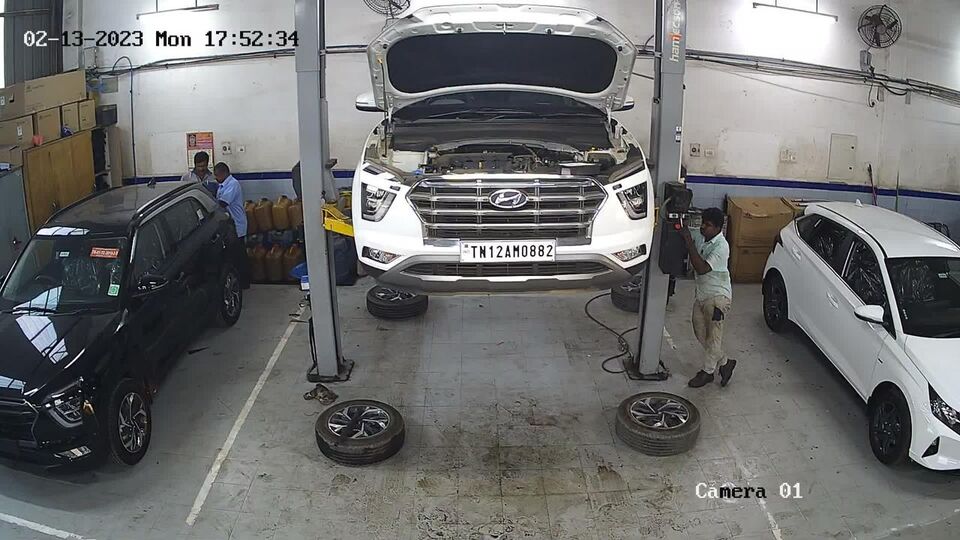
The current wide view of the bay and the work on the lift.
rtsp.me takes the stream from an existing IP camera and turns it into video that is easy to watch in a browser. The manager sees what is happening in the bays and across branches, and when it is needed the customer gets restricted viewing of a wide shot of the area where their car is being serviced.
This format makes the process easier to follow, cuts down the number of calls asking about repair status and gives the owner a factual picture of the workload. Authentication against the work order and granting access to a particular customer are implemented by the shop’s website, CRM or job management system, while rtsp.me supplies the video and the player.
Connect your repair shop camerasA wide shot of the repair bay lets the car owner see that the vehicle has been taken in, is in the agreed area and is being worked on. The video complements the service adviser’s messages and helps the customer stay calmer about lengthy jobs.
Access should be opened only to the specific camera and only for a limited period. The link can be placed in the customer’s account or in an order status message, but checking the order number, phone number and any other credentials is done by the shop’s information system, not by the video platform.
A camera does not confirm the quality of hidden technical operations and does not replace the fault report, the estimate, the work order or the completion certificate. Its job is to give a clear visual context and make the interaction more transparent.
The manager can assess how busy the lifts are, whether working areas are being respected, the order in which vehicles are handled and whether a branch has actually opened. Several cameras help you see quickly where a delay has built up and which bay is ready to take the next car.
Streams from different branches are gathered in one account. The manager does not have to connect to each recorder separately: the site and camera they need are available through a browser on a computer, tablet or smartphone.
An overview of the bays helps to agree on handing the car back, check that the working area has been cleared and answer an organizational question from the customer without constantly walking through the workshop.
If the workshop already has IP cameras with an accessible RTSP stream, they can be connected to rtsp.me without removing the recorder or replacing the whole system. It is better to keep the public or customer-facing field of view separate from the security cameras.
A steady wide shot suits a bay well: the car and the working area are fully visible, but documents, diagnostic screens and neighboring vehicles cannot be read. Before connecting, check network access, the RTSP settings, the codec and the stability of the outbound link.
The tools suit both internal oversight and carefully arranged customer viewing.
Start with one clear field of view and decide in advance who will be watching the stream: managers only, or the customer behind a particular order as well.
Before going live, test the scenario on a mobile device, check how long customer access stays valid and confirm that neighboring working areas do not appear in frame.
Different fields of view serve different purposes, so access rights to them should not all be the same:
A customer usually needs just one neutral field of view of their own bay. Cameras covering the till, the store, the staff room and the security perimeter should remain internal.
A live wide shot of the bay shows the customer that their car is being worked on, and shows the owner how busy the workshop is.
LIVEThe current wide view of the bay and the work on the lift.
The cloud archive helps you check when a car entered the bay, the sequence of visible stages and the state of the working area. Choose the retention period according to the actual task and your internal rules, and grant access only to staff with the corresponding authority.
Monitoring reports signal loss so that the person responsible can check the camera’s power supply, the local network or RTSP availability. It watches whether the video stream is present, but it does not judge the quality of a repair and does not guarantee that a particular operation was captured in frame.
For the customer, video reduces uncertainty and makes the service easier to follow. For the owner it is a tool for day-to-day management, checking workload and reviewing events from the recording — not a replacement for production procedures.
Before going live, establish the legal basis for video surveillance, put up the required notices and set rules for access and retention. Staff and visitors must be informed to the extent that applicable law requires.
Do not point a customer-facing camera at documents, close-ups of VINs and number plates, payment terminals, diagnostic screens, visitors’ faces or the vehicles of neighboring customers. Where necessary, use a different field of view or a separate camera.
Connect the cameras already in your bays, bring your branches together and give managers convenient viewing in a browser, with an archive and availability monitoring.
For the customer-facing scenario, prepare a separate safe field of view and integrate the player with the website or job management system that will handle authorization.
Start connecting