 LIVE
LIVEParking area
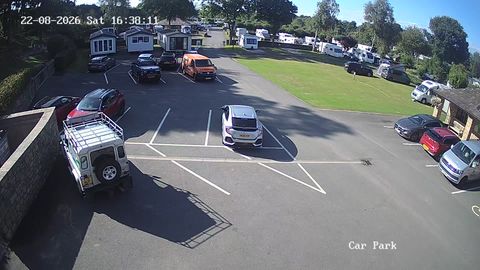
A wide view of the parking rows and the current occupancy
A wide shot of the parking lot helps a visitor judge the situation outside a shopping center, office, hotel, airport or tourist attraction before setting off.
rtsp.me receives the stream from an existing IP camera and opens it in a browser or on your website, with no separate media server.
Connect parking lot camerasLive video shows where the entrance is and how full the parking rows visibly are. It adds an up-to-date visual reference to your directions map.
The player can go on the contacts page or the visitor information page. Reservations are handled by the website or the site's parking system; the camera only shows the current field of view.
Private streams help an operator watch several sites, entrances and parking lot levels.
A public stream is built around a wide shot, while working fields of view stay internal. That way a visitor gets useful information without your internal processes being revealed.
The field of view should show overall occupancy without turning public video into a means of recognizing people or number plates.
An overview camera helps visitors judge the visible occupancy of the parking rows and the situation before the entrance.
LIVEA wide view of the parking rows and the current occupancy
The service combines publishing and oversight of parking lot streams.
Decide which fields of view are public and which are internal, check the RTSP stream and review the rules on siting cameras.
Viewers open the video in a modern browser, and the access mode is set per stream.
A public overview reduces uncertainty before a journey and shows the way to the entrance. That is useful for out-of-town sites and places with awkward access.
Private streams give staff access to several areas. For a chain of branches, cameras can be organized by site and by user.
Video does not promise a free space by the time you arrive, but it does give current context. Exact availability is provided by the site's own system.
The cloud archive helps you go back to a chosen time and look at movement by the entrance or the overall situation within the field of view.
rtsp.me watches the stream and notifies you of a signal loss so that a member of staff can check the power, the network or the camera.
The retention period and the list of users are set according to the site's needs and the applicable requirements.
For a public stream, choose a wide field of view with no readable number plates, faces, terminals or screens. Cameras covering tills and back-office rooms stay private.
The owner is responsible for the lawfulness of siting the cameras, for informing visitors and for handling the recordings. The archive is made available only to authorized staff.
Connect your existing RTSP cameras and show visitors a safe wide shot of the parking area.
Set up private viewing of working fields of view, an archive and signal monitoring for the site team.
Create a parking lot stream