 LIVE
LIVERacks and aisles
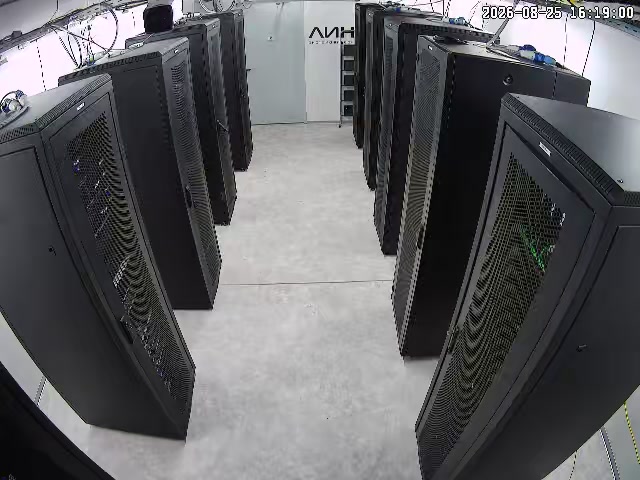
The current view of the racks and the working aisles.
rtsp.me opens the streams of existing IP cameras in the browser on a computer and on a mobile device. The engineer on duty can see the door, the common aisle or approved work taking place at a remote site.
A cloud archive helps you match visible actions against tickets and the access log, and monitoring reports the loss of a signal. A camera does not replace DCIM, access control, environmental sensors or the presence of responsible staff.
Connect private camerasA wide field of view lets you check whether the visible door is shut, whether the contractor is in the agreed area and whether the aisle is clear of obstructions. That is useful context for the duty team when the site is remote.
A recording is compared with the ticket, the access control system and the change log. An image cannot reliably establish someone's identity, their authorization, the state of a server or the cause of a failure.
An accessible RTSP stream can be connected to rtsp.me while local recording is kept in place. H.264 and H.265 are supported by widely available IP cameras.
The network connection is designed in line with your security policy: the camera must not open a route into the management segment. Consoles, diagrams, port labelling, keys and secrets are kept out of the frame.
A private wide shot of the machine room shows the state of the racks and the presence of staff.
LIVEThe current view of the racks and the working aisles.
These features are used in private mode only:
Agree the connection with the owners of physical and information security.
Test how access is revoked and how the duty shift responds to a notification.
Fields of view are chosen on the principle of the minimum that is sufficient:
Close-ups of consoles, patch panels and labelling are excluded.
Cameras are grouped by site and by room. Each user is given only the set they need, and links and passwords are revoked when a role changes.
A public setup is unacceptable for a server room. The HTML player is used only on a controlled internal domain; embedding it does not remove the need for organizational safeguards.
A cloud archive helps you reconstruct the visible sequence of a visit or of works and compare it with the access control system and the tickets. The retention period is kept to a minimum and documented.
rtsp.me notifies you if the video stream is lost. That is a separate signal, unrelated to the state of the servers, the air conditioning and the power supply.
Screens, passwords, diagrams, serial numbers, backup media and keys must not be shown. Access and exports are logged by organizational means, and staff are notified about the video surveillance.
Video does not replace DCIM, access control, temperature, humidity, smoke and leak sensors, fire suppression, UPS and network monitoring, written procedures or staff on duty. A camera does not confirm that services are available or that there is no physical threat.
Connect approved cameras in remote rooms for viewing by authorized staff, for the archive and for signal notifications.
Add visual context to DCIM, access control and tickets without revealing the infrastructure or standing in for specialized monitoring.
Set up private viewing